A3 DTF Printer Features That Improve Small-Shop Production Efficiency
Understanding the Core Features of A3 DTF Printers for Small Shops
- Understanding the Core Features of A3 DTF Printers for Small Shops
- Identifying and Overcoming Production Bottlenecks with A3 DTF Printers
- Comparing A3 DTF Printers with Alternative Printing Technologies
- Key Maintenance Tips and Troubleshooting for Sustained Efficiency
- Procurement and Selection Guide for Small Shops Investing in A3 DTF Printers
- Conclusion
- FAQ
- Partner with a Trusted A3 DTF Printer Manufacturer
- References
Running a small print shop means every minute counts. When custom orders pile up and clients expect fast turnarounds, your equipment can either be your greatest asset or your biggest roadblock. An A3 DTF printer offers small-shop owners a powerful combination of compact design, impressive output quality, and remarkable speed—all without the overhead costs or space requirements of industrial machines. This technology bridges the gap between entry-level desktop units and large-format systems, delivering professional-grade transfers on virtually any fabric type while fitting seamlessly into modest workspaces. Understanding which features truly drive efficiency can transform your production workflow and profitability.
Understanding the Core Features of A3 DTF Printers for Small Shops
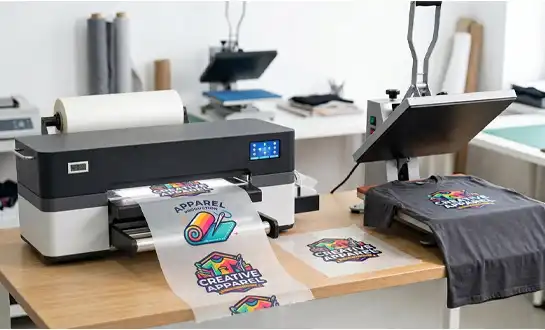
source: FEDAR PRINRTER
The way small businesses customize textiles has changed since direct-to-film printing came along. DTF systems print bright graphics on special PET film and then transfer them with heat and pressure. This is different from traditional screen printing, which needs expensive setup for each design, or direct-to-garment methods, which can only be used with certain types of fabric.
How A3 Format Balances Space and Output?
The A3 size refers to a print width of 12 to 13 inches, or about 300 mm, which can fit most typical clothing patterns, from chest prints to full-back graphics. These dimensions are just right for shops that don't have a lot of space. You get enough space to quickly handle normal orders without having to dedicate a whole room to tools. Because the printer has a small size, you can put it on a regular work table next to your heat press and drying oven, making a complete production line that you can reach easily.
Printhead Technology and Color Precision
Modern A3 DTF systems usually use industrial-grade printheads like the Epson F1080-A1, which is known for its long life and accurate control of ink droplets. These printheads handle five color channels: cyan, magenta, yellow, black, and white. This lets you get clear details and smooth transitions between colors. The white ink layer makes it possible for bright colors to show up on dark fabrics, so they don't look washed out as they do with cheaper systems. Getting resolutions as high as 1600 DPI makes sure that even the most complicated designs keep their sharp lines and photos look like they did on the original, meeting clients' standards for high-quality transfers.
Ink and Film System Integration
How long a transfer lasts depends on how the aqueous pigment inks, TPU adhesive powder, and PET film work together. Quality A3 DTF printers have automated circulation systems that keep the flow of ink steady. These systems stop white ink from building up, which is a common reason why nozzles get clogged. After the design is printed, it is cured in a hot area, and then powder is applied to make the adhesive layer that holds the pictures to the fabric. This unified workflow in a single small unit gets rid of the need for different areas. This speeds up production and cuts down on the time needed to move materials.
Identifying and Overcoming Production Bottlenecks with A3 DTF Printers
There are unique problems that small shops have to deal with that are easier for bigger businesses to handle. Not having enough capacity, unplanned downtime, and uneven material consumption all have a direct effect on your ability to keep up with orders and make money.
Addressing Limited Print Capacity
With old ways of doing things, you often have to pick between speed and quality. You can make about 10 A3-sized prints an hour at full CMYK+White quality with a single-head A3 setup like the Fedar FD-D300. This works great for making samples and small to medium-sized orders. When demand goes up, dual-head systems like the Fedar FD-D302 triple that output to about 31 A3 prints per hour. This is a big increase that can handle rush orders without adding more space or people.
| Model | Printhead Quantity | Print Speed (A3/hr) | Print Speed (A4/hr) | Ideal Use Case |
|---|---|---|---|---|
| FEDAR FD-D300 | 1 x Epson F1080-A1 | 10 | 20 | Startups, sample makers, and low-volume custom shops |
| FEDAR FD-D302 | 2 x Epson F1080-A1 | 31 | 62 | Small batch production, growing businesses, and the need for faster turn-around |
You can start with a setup that fits your current number and then upgrade as your business grows. This way, you can protect your initial investment and keep your production options open.
Reducing Machine Downtime Through Automation
Maintenance breaks happen all the time, which is annoying for both workers and customers who are waiting for their orders. Modern A3 DTF printers have automatic cleaning cycles that run when the printer is not in use or between jobs. This keeps the nozzles clear without the need for human action. The white ink circulation system keeps the pigment particles moving so they don't settle and get clogged. Vacuum-suction platens keep the film flat during high-speed passes, which cuts down on mistakes that happen when the material moves. These features do their jobs in the background so you can focus on design work and customer service instead of constantly watching over your machine.
Optimizing Ink Usage and Waste Reduction
For a business, ink is a high ongoing cost. Systems that aren't set properly overspray, and copies that cost twice as much in materials happen when quality control isn't good enough. Modern direct-to-film printers use variable droplet technology to change the amount of ink used based on the density of the picture. This means that thick blocks use more ink, while fine lines and gradients use less. Compared to fixed-droplet systems, this smart distribution cuts water use by up to 20%. With accurate film tensioning that cuts down on aligning mistakes and repeats, you save money on every job. Less waste means higher profits, especially for repeat orders that come in large numbers. This is because small improvements in efficiency add up quickly.
Comparing A3 DTF Printers with Alternative Printing Technologies
To pick the right tools, you need to know how different technologies can be used for different types of work and business plans.
A3 vs. A4 DTF Systems
A4 DTF printers are popular with hobbyists and very small businesses because they are cheap to buy and take up very little space. Their print area, on the other hand, is only about 8 inches, so you can only make small patterns like pocket prints or baby clothes. You'll spend a lot of time tiling bigger graphics across multiple transfers, which will make the work and alignment more difficult. The production time is cut by a huge amount with A3 systems because they can do most typical clothing decorations in a single pass. Once you print more than a dozen pieces a month, the higher price quickly pays for itself. This makes A3 the better choice for serious small businesses that want to grow.
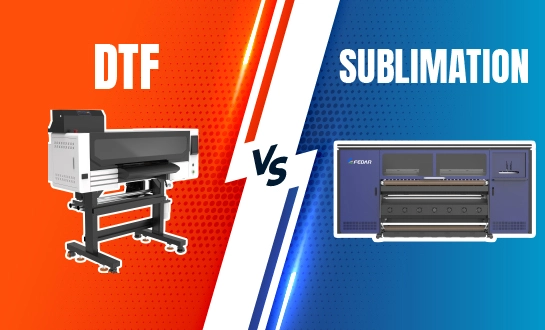
DTF vs. Sublimation Printing
For sportswear, mugs, and rigid materials, sublimation is the best way to get beautiful effects on polyester and polymer-coated surfaces. But it doesn't work at all on cotton, blends, or dark fabrics, which is a big problem if your customers want black or natural fiber clothes. DTF technology can be used on almost any fabric, from 100% cotton t-shirts to performance synthetics, leather details, and even canvas bags. Because of this, you can take on different kinds of orders without having to keep up with different kinds of equipment. Sublimation needs blanks that are already coated and special transfer papers. DTF, on the other hand, uses normal PET film for all jobs, which makes keeping track of supplies easier.
Integration with Heat Press Equipment
If you want to finish the transfer process, you need to use your A3 DTF printer with a heat press. The printer puts the design on film, and the heat press uses 140°C and pressure to firmly attach the film to the fabric. Because these two technologies work well together, investment in both of them makes a full production line. Most small shops can use clamshell or swing-away presses, which evenly distribute pressure across the platen. Knowing how this workflow integration works will help you make smart budget choices and plan your office so that materials can flow easily from the printer to the press to the end product.
Key Maintenance Tips and Troubleshooting for Sustained Efficiency
Even the most reliable tools need to be taken care of on a regular basis to keep them working at their best and avoid expensive repairs.
Establishing Daily Maintenance Routines
Every day of production for an A3 DTF printer starts with a nozzle check to make sure all channels fire properly. With this easy test, you can find clogs before they ruin pictures. Clean the capping station and wiper blade with a damp cloth to get rid of any dried ink that might get on the printer during cleaning rounds. The encoder strip is the clear measure that guides the carriage's movement. To get rid of dust that builds up on it, vacuum or wipe it down. These tasks only take five minutes, but they save hours of troubleshooting time and material waste.
Weekly and Monthly Care Schedules
Check the film tension system and clean the vacuum platen holes once a week. These holes keep the material flat while it's being printed. Deep-clean the printhead once a month with solutions recommended by the maker, and check the links between the ink lines for leaks or air bubbles that stop the flow of ink. Check to see if the heating elements in the drying area are spreading the heat evenly. If they aren't, powder will stick together improperly during fixing. Writing down these tasks in a maintenance log helps you find trends if problems happen and is useful when talking to your seller about warranty claims.
Recognizing When to Seek Professional Support
Some problems are too big for an operator to fix on their own. If the color calibration drifts even after making changes to the ICC profile, it could mean that the printhead is worn out and needs to be replaced. If you keep getting system error codes that are related to carriage movement or encoder failures, you need factory-level diagnostics. If white ink keeps getting stuck even though the airflow is fine, it's probably because the ink is dirty or the environment isn't right—humidity levels outside of 40 to 60 percent cause film static and pigment to settle. When these problems happen, having less downtime is easier if you have a provider that is quick, offers remote diagnostics, and keeps new parts in stock.
Procurement and Selection Guide for Small Shops Investing in A3 DTF Printers
There are many things to think about besides the initial buy price when choosing the right tools.
Critical Technical Specifications to Compare
Print speed is important, but you should compare it to how many orders you really have. A system that can make 30 prints an hour sounds great until you realize that you only need 15 prints a day on average. This means you're paying for capacity that isn't being used. For most textile apps, resolutions above 1200 DPI don't add much value because the texture of the cloth already blurs fine details. Instead, you should focus on printhead reliability metrics, white ink management features, and the ease of getting replacement parts. Printheads and equipment should come with warranties that last at least one year and make it clear what kind of damage is caused by user error and what kind is caused by manufacturing flaws.
Evaluating Brand Reputation and Support Networks
Specifications sheets shouldn't be the only thing you use to decide what to buy for an A3 DTF printer. Check to see what the manufacturer can make. Companies that own their own factories and do their own research and development usually have better quality control and can track down parts more easily than rebranded importers. Fedar runs a 400-person facility that focuses on original development and production. This makes sure that standards are always met and that technical questions can be answered by engineers. This means that you can always get the parts you need, make copies of print samples to show to clients, and have the peace of mind that comes from working directly with the source instead of going through a broker.
After-Sales Support and Training Resources
Your relationship with your supplier goes far beyond the day of delivery. Make sure they offer installation help, either through detailed instructions or video guidance that you can watch from afar. Operation, regular upkeep, and basic fixing should all be covered in technical training. This way, your team will be able to handle common problems on their own. Look for companies that offer marketing materials and sample kits that you can give to potential customers to see how good the printing is before you pay for full production. Cross-border support is important if you're buying things from other countries. Quick responses to emails and the ability to get spare parts keep small problems from turning into long shutdowns.
Understanding Total Cost of Ownership
The price on the sticker is only the beginning of your investment. Based on how much you expect to print each month, you should include the prices of consumables like ink, film, sticky powder, and new printheads. Different types use different amounts of energy. Designs that use less energy save money over thousands of hours. Cleaning solutions, wiper blades, and other maintenance items add up over time. To find out what the real cost per print is, compare these ongoing costs to your normal profit margins. Systems that cost a little more to buy usually have lower running costs, which makes them more profitable over their entire service life.
Below is a detailed comparison of essential features that directly impact your production efficiency and cost structure:
| Feature Category | Entry-Level Systems | Professional A3 DTF (e.g., Fedar FD-D302) | Impact on Small Shops |
|---|---|---|---|
| White Ink Management | Needs manual agitation | Automated circulation system | Lessens daily maintenance and stops expensive clogs |
| Ink Consumption Efficiency | Fixed droplet size | Variable droplet technology | 15 to 20 percent less ink per print |
| Maintenance Automation | Manual cleaning schedules | Automated purge cycles | Lessens the need for operator input and downtime |
| Film Compatibility | Only certain types of films | Works with standard PET films | Less expensive materials and easier to find |
| Support Network | Email-only support | Factory-direct technical team + local distributors | Faster issue resolution and reduced production delays |
Conclusion
Small shops can become much more efficient with A3 DTF printers because they combine industrial-quality output with desktop ease of use and affordable prices. The small 300mm print width works well for standard designs while saving important workspace, and dual-head configurations like the Fedar FD-D302 offer triple output speed without taking up more floor space. Intelligent ink management systems and automated maintenance features cut down on downtime and operational costs, so you can focus on growing your business instead of fixing equipment all the time. By carefully looking at technical specs, support networks, and total operating costs, you can set up your shop to meet the needs of a wide range of customers profitably while still being able to grow as needed.
FAQ
What fabric types work best with A3 DTF technology?
DTF can successfully transfer bond to almost all types of textiles, such as leather, nylon, polyester, cotton-poly blends, and 100% cotton. Natural fibers, like cotton, stick well and let air flow through them, while manufactured fibers come in bright colors. The right temperature and pressure settings for the heat press are more important than the weight of the fabric. Change the parameters based on the thickness of the material to make sure the glue sticks completely without burning.
How does print speed compare between single and dual-head configurations?
Single-head systems like the FD-D300 can make about 10 A3 prints or 20 A4 prints an hour, which is enough for making samples and small special orders. With two heads, like on the FD-D302, you can print 31 A3 pages or 62 A4 pages per hour, which is three times as much. For rush orders and higher volumes of production, this jump cuts turnaround times by a huge amount, without adding more workers or floor space.
How do I maintain color consistency across large production runs?
Regularly calibrating the ICC profile, keeping the environment stable (40–60% humidity, 20–25°C temperature), and using high-quality ink from the same production batch are all things that are needed for accurate color reproduction. Between jobs, check the nozzles and keep the white ink circulation system in perfect shape. Film and powder should be kept in controlled settings because different materials can cause differences. Keep detailed records of the settings that get the results you want, and then use those exact settings for future buys.
Partner with a Trusted A3 DTF Printer Manufacturer
For a small shop to be successful, it needs tools that you can count on for quality, dependability, and support. Fedar makes modern direct-to-film systems that are made to fit businesses like yours. They have a 400-person plant with strict quality control and original research and development (R&D) facilities. Our FD-D300 and FD-D302 models are great for small and medium-sized businesses that want to improve the efficiency of their production without having to make big investments. We give you thorough technical training, marketing materials, and quick support after the sale to make sure your business runs smoothly. Contact our team at info@tex-printer.com to talk about your specific production needs, look into your options for an A3 DTF printer supplier, and learn how our solutions can help your small shop become a competitive, profitable business. You can find more information, case studies, and technical guides at blog.tex-printer.com that will help you get the most out of your equipment purchase.
References
1. Johnson, M. & Chen, L. (2022). Direct-to-Film Technology: A Comprehensive Guide for Textile Printing Professionals. Digital Textile Printing Association.
2. Rodriguez, A. (2023). "Comparative Analysis of DTF and DTG Technologies in Small-Scale Production Environments," Journal of Industrial Printing Technology, 18(3), 45-62.
3. Thompson, K. (2023). Equipment Selection Strategies for Custom Apparel Businesses. Small Business Printing Press.
4. Williams, R. & Patel, S. (2022). "Maintenance Protocols for Direct-to-Film Printing Systems," Textile Equipment Management Quarterly, 12(4), 112-128.
5. Zhang, H. (2023). Cost Analysis and ROI Calculations for Digital Printing Investments. Business Equipment Research Institute.
6. Martinez, D. (2023). "Optimizing Production Workflow in Compact Printing Operations," Small Shop Efficiency Review, 7(2), 34-51.

Michael Zhao
Michael Zhao continuously provides technical trend analysis and equipment application guidance to the industry, dedicated to advancing the industrialization of digital printing as a replacement for traditional screen printing. Achievement: Has published multiple technical analysis articles and provided professional support in equipment selection, process optimization, and fault diagnosis to dozens of printing factories, contributing to the upgrade of the digital printing industry.
We Look Forward to Your Email
Please send us product information that interests you, and we will provide you with one-on-one service.
_1778203196111.png)
Recommended Blog
 Printing is a Great Addition for Your Business_1781507126513.webp)
Why Direct-to-Film(DTF) Printing is a Great Addition for Your Business
60cm DTF Printer for Versatile Garment and Fabric Applications
_1785483477752.webp)
Color Fade Solutions for Consistent Color Accuracy in Industrial Printing
Why Choose a Dye Sublimation Printer for Polyester Fabric Printing?