How to Fix White Ink Alignment Issues in DTF Printers?
Understanding White Ink Alignment Issues in DTF Printers
- Understanding White Ink Alignment Issues in DTF Printers
- Step-by-Step Solutions to Fix White Ink Alignment Problems
- Preventive Measures and Maintenance Tips to Avoid Recurring Issues
- Comparison of White Ink Alignment Solutions and Equipment Recommendations
- Troubleshooting Advanced White Ink Alignment Problems
- Conclusion
- FAQ
- Partner with Fedar for Reliable DTF Printing Solutions
- References
White ink alignment issues in DTF printers typically stem from printhead misalignment, incorrect RIP software settings, or inconsistent ink flow caused by titanium dioxide sedimentation. The solution involves performing nozzle checks, recalibrating printheads through manual adjustment or automated alignment tools, cleaning capping stations to prevent clogs, and ensuring your RIP software's white ink layer settings match your substrate requirements. Regular maintenance and proper white ink circulation systems reduce recurring problems, keeping your transfer prints sharp and your production schedule on track.
Understanding White Ink Alignment Issues in DTF Printers
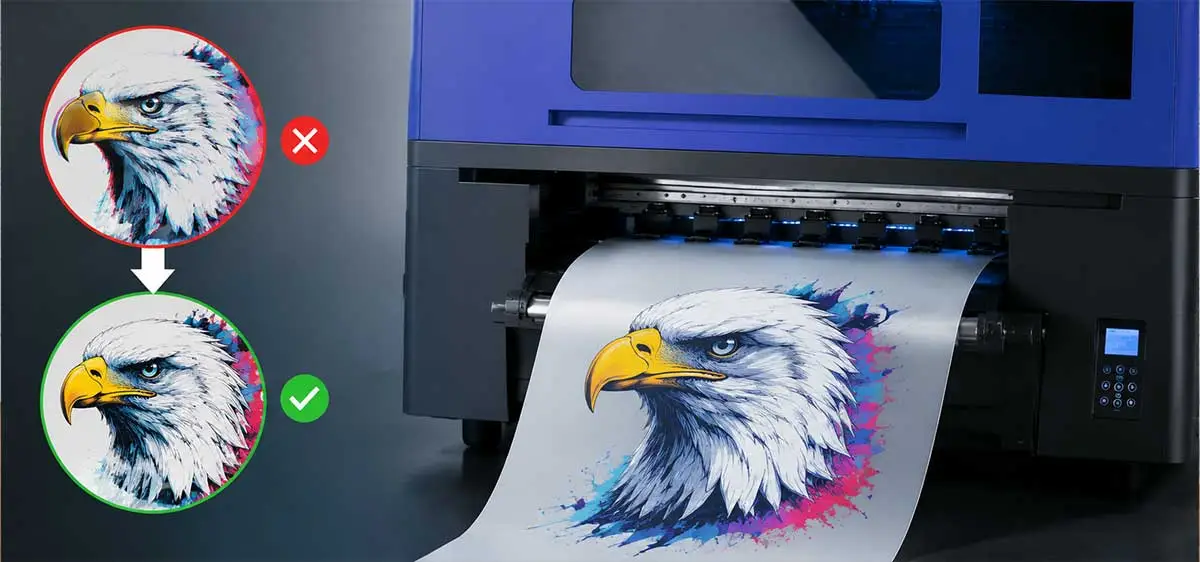
When Direct-to-Film printing, white ink is very important because it makes sure that bright colors show up right on dark fabrics. Even a small change in orientation can ruin the whole picture. Misalignment shows up as ghosting, which is when copies of the design look off from the original, blurred edges that make it hard to see fine details, and color shifts when CMYK inks don't register properly over the white base layer. These flaws don't just hurt the look; they also have a direct effect on how happy customers are and how quickly orders are filled in production settings.
Common Symptoms of Misalignment
When the white ink layer prints slightly off from the color layers, it's called ghosting. This makes a halo effect around design elements. When writing quickly, droplets don't always land in the same place, which causes blurriness that is especially noticeable in text smaller than 8-point size. When the white base doesn't line up with the CMYK layers, color shifts happen, leaving muddy tones or white edges around colored areas. During long print runs, these symptoms often get worse, which could mean that the machine is slowly moving or that there are problems with the software settings that need to be fixed right away.
Root Causes from Multiple Perspectives
Some mechanical causes are printhead carriage rails that aren't tight enough, worn encoder strips that keep track of where the print is, and vibrations caused by mounting surfaces that aren't strong enough. Software problems happen when bi-directional printing settings are wrong, white ink layering processes are set up incorrectly in RIP configurations, or firmware is old and doesn't adapt to changes in the environment. Because white ink is made of titanium dioxide particles that settle quickly without being able to move around, they can cause nozzles to get clogged and flow rates to be uneven. Conditions like low humidity (less than 40%) cause static electricity, which changes how the powder is distributed. Temperatures above 30°C speed up the drying of ink on printhead surfaces before transfer happens.
Step-by-Step Solutions to Fix White Ink Alignment Problems
Finding problems with alignment needs a methodical process that includes both visual inspection and technical testing. Operators can quickly find problems and apply focused solutions when they understand the connection between hardware precision and software configuration.
Hardware and Software Inspection Checklist
Start by doing a full nozzle check print to find channels that are stopped or not firing right. Move the printhead carriage slowly from side to side to check for lateral play. Any movement greater than 0.5 mm means the bearings are worn out and need to be replaced. Check the encoder strip for damage, such as dust or ink left over from printing, that could make it impossible to track the position. Check the links between the printhead and the mainboard's cables. Signals that go out and on can make droplet placement unpredictable. Check that the capping station keeps the right seal pressure; nozzles can dry out between prints if there isn't enough wetness, which can cause partial clogs that throw off the alignment.
To check the software, you have to look over the RIP settings for the white ink layer order and choke values. To keep the edges from showing, white ink should print a little smaller than color layers (usually 0.2 to 0.5 mm choke). Make sure that the bi-directional printing calibration values match how your printheads are set up now. Values that work for single-head setups will throw off the orientation of dual-head systems. To find directional errors, test with a standard alignment pattern that has thin lines and markers at different angles.
Manual Printhead Calibration Procedures
To start manual alignment, go to your printer's repair page, and for DTF printer, you can print the calibration pattern, which shows numbered grid lines that are spaced out by small amounts, and find the numbered line that shows the white and color layers perfectly lined up, and this value should be entered into the printer's alignment offset settings, and this value is usually given in 1/1440-inch steps, and calibration needs to be done again for both uni-directional and bi-directional modes separately because the mechanical behavior changes for each print method. You can print the calibration pattern, which shows numbered grid lines that are spaced out by small amounts. Find the numbered line that shows the white and color layers perfectly lined up. This value should be entered into the printer's alignment offset settings. This value is usually given in 1/1440-inch steps. Calibration needs to be done again for both uni-directional and bi-directional modes separately because the mechanical behavior changes for each print method.
To make a physical adjustment, you have to loosen the screws that hold the printhead in place and use calibrated shims or adjustment screws to make small changes to the position. Some industrial models, like those with Epson F1080-A1 printheads, have mechanical adjustment screws that are stepped up or down by 0.1 mm. After making the necessary physical changes, make three test prints in a row to make sure the printer is stable. The alignment should stay the same on all three samples. Keep track of drift patterns over time by writing down your calibration values in maintenance logs.
RIP Software Configuration for Enhanced Accuracy
Change the layering order and white ink density to get the most out of your RIP software. A white ink density setting between 200 and 240% usually gives good opacity without using too much ink, which can cause bleeding. Set up the white ink to print in two passes, with a small gap (0.1 to 0.2 mm) between each one to account for the film expanding while it cures. Enable advanced features like variable dot sizing, which makes the edges sharper by using smaller droplets for fine details.
ICC profile selection has a big effect on how alignment is perceived. When profiles are set up for high-speed production, they may sacrifice accuracy for speed, but when profiles are set up for photographic quality, they require tighter color registration. To find the best match, try out different types with your individual film and powder mix. Every season, you should update your profiles because changes in humidity can affect how ink works and how the film surfaces.
Preventive Measures and Maintenance Tips to Avoid Recurring Issues
Structured maintenance protocols form the backbone of consistent print quality. Production facilities that implement systematic maintenance schedules report 40% fewer alignment-related stoppages compared to reactive maintenance approaches.
Daily, Weekly, and Monthly Maintenance Schedules
Every day, you need to check the nozzles when you first turn them on and every four hours while they are running continuously. To keep ink from building up and scraping across nozzles, clean wiper blades with lint-free swabs that have been moistened with cleaning solution. Check that the white ink circulation system is working by looking at flow signs or pressure gauges. Within two hours, white ink that has been sitting still will start to settle down. Check the powder shaker's vibration pattern to ensure even coverage. If the powder isn't spread out evenly, it can cause differences in adhesion that mimic alignment issues.
These daily tasks only take 15 minutes per shift, but they save hours of troubleshooting time and materials that would have been wasted. Documentation during daily checks sets a standard for finding slow decline before it affects production.
Deep-clean capping stations once a week using ultrasonic cleaning baths or specialized cleaning products. Remove and inspect the encoder strip. Clean it with isopropyl alcohol and make sure it is transparent. Lubricate the carriage rails with lubricants recommended by the manufacturer. Too much lubrication attracts dust, and not enough lubrication causes micro-vibrations that change where droplets land. To find early drift, use high-resolution patterns in extended printhead alignment tests.
Every month, you should replace the white ink delivery system's dampers and ink filters because partial clogs cause pressure fluctuations that make alignment difficult. Use feeler gauges or laser measurement tools to ensure the printhead surface is flat. Printheads that aren't straight can't keep the same distance from the film surface. Firmware and RIP software should be updated to include changes made by the manufacturer to alignment methods and environmental compensation.
Proper White Ink Storage and Handling
Even when it's not being used, white ink needs to be stirred every 48 hours. Keep ink bottles in places with controlled temperatures between 15°C and 25°C and out of direct sunlight, which breaks down pigments faster. Use a paint mixer tool for bigger containers and shake the bottles hard for 60 seconds before installing them. Install circulation systems that pump white ink through a loop all the time. This will keep the ink from settling in the DTF printers pathways and supply lines.
High-quality white inks made for Direct-to-Film use stay stable longer than textile inks that have been modified to work with this technology. Dispersants and surfactants in high-end inks keep titanium dioxide suspended for longer amounts of time, which means that maintenance is needed less often. Test the ink suppliers by pouring the ink into a clear container and watching how it settles over the course of 24 hours. Better formulations don't layer as much, while inferior ones separate clearly and need to be stirred all the time.
Operator Training and Standard Operating Procedures
Industrial printing groups say that full training for operators cuts alignment problems by 60%. As part of training, people should learn how to spot the first signs of misalignment, how to correctly read test prints, and how to decide when to call technical support. Operators need to know how the environment affects print behavior. For example, when it's dry, the curing temperature needs to be higher, and when it's humid, the ink temperatures need to be lowered.
Calibration times should be written down in Standard Operating Procedures based on the number of prints, not on the calendar. When printing 1,000 A4 transfers every day, the equipment needs to be recalibrated every 500 prints. In low-volume operations, the alignment may last for 2,000 prints. SOPs need to say what kinds of deviations are acceptable. For example, deviations in alignment of less than 0.3 mm might be fine for promotional items but not for high-end clothing that needs to be photographed.
Comparison of White Ink Alignment Solutions and Equipment Recommendations
The choice of equipment has a big effect on how stable the alignment is and how easy it is to maintain. Compared to entry-level machines, industrial-grade systems have features that reduce drift and make recalibration easier.
Leading Equipment Options for Precision Alignment
The Fedar FD-D300 and FD-D302 models show how careful engineering can solve problems with alignment. Both use the tried-and-true Epson F1080-A1 printhead, which is known for being mechanically stable and putting droplets in the same place over its entire life.
| Model | FEDAR FD-D300 | FEDAR FD-D302 |
|---|---|---|
| Printhead Quantity | 1 | 2 |
| Print Width | 300mm | 300mm |
| Max Resolution | 1600 DPI | 1600 DPI |
| Max Speed (A3) | 10/hr | 31/hr |
| Max Speed (A4) | 20/hr | 62/hr |
| Print Colors | CMYK+W | CMYK+W |
The FD-D300 is an easy-to-use entry point for studios and sample makers that need industrial quality but don't need big equipment. Its single-head design makes alignment easier, and its 1600 DPI resolution is good enough for detailed images and text. The small size saves floor space and energy, which are both very important in small-batch production settings where equipment needs to be useful in a variety of ways.
When production volumes go up, the FD-D302's dual-head architecture triples them while keeping alignment accuracy high thanks to synchronized printhead control. The system's built-in white ink movement stops the buildup problems that happen with slower equipment when ink stays in supply lines between prints. Both models can handle print-on-demand workflows with no minimum order amounts. This means that workers can keep the machines calibrated by using them regularly instead of having to deal with alignment drift during long times of inactivity.
Compared to similar systems on the market, these models offer both desktop ease of use and industrial durability, and for DTF printer, vibration-induced misalignment is kept to a minimum by the rigid aluminum frame construction, and external factors that affect viscosity are kept to a minimum by sealed ink systems, and service accessibility stands out—major parts can be accessed and replaced without the help of a factory technician, which cuts down on downtime from days to hours. Vibration-induced misalignment is kept to a minimum by the rigid aluminum frame construction, and external factors that affect viscosity are kept to a minimum by sealed ink systems. Service accessibility stands out—major parts can be accessed and replaced without the help of a factory technician, which cuts down on downtime from days to hours.
Calibration Accessories and Software Solutions
Buying precise measurement tools speeds up the fixing process and increases the time between maintenance visits. Laser alignment sensors give real-time feedback while the printhead is being installed. This makes sure that the printer is mechanically aligned before the software calibration starts. Digital microscopes with measurement tools let users measure orientation errors in micrometers, which sets clear criteria for when to calibrate the microscope.
Advanced RIP software has built-in alignment routines that print, scan, and figure out offset values automatically, without the operator having to do any work. These methods make it easier for people to read calibration patterns correctly, and the results are the same for all users. RIP solutions that are connected to the cloud store alignment profiles for different types of film, powder brands, and working conditions. This makes it easy to switch profiles when the production conditions change.
Troubleshooting Advanced White Ink Alignment Problems
Alignment problems that are more complicated need more in-depth testing methods and could be signs of worn-out parts or system-level issues that go beyond regular changes.
Addressing Persistent Ghosting and Double Images
If ghosting keeps happening even after proper calibration, it's likely that the encoder strip is dirty or the printhead voltage is dropping. First use compressed air to clean the encoder strip, then use an alcohol-soaked lint-free cloth to do the same. Check the encoder for physical damage like cuts or warping. Even small flaws in the encoder can stop it from tracking its position. Use the manufacturer's diagnostic software to check the firing voltage of the printhead. Piezoelectric elements that have been worn down need higher voltage to eject droplets properly, which causes timing delays that show up as ghosting.
When printing in two directions, double images clearly show that the carriage drive system has mechanical feedback. Replace drive belts that are worn out and have stretched over time, making it hard to tell where you are when you change directions. Check where the encoder sensor is in relation to the encoder strip. The best distance between them is 1-2 mm; any closer and reflections will cause false readings, and any farther and the signal strength will drop. Some more advanced systems let you change the values of the bi-directional printing delays to fix mechanical backlash without having to replace any hardware.
When to Seek Professional Support
Know when factory-trained technicians should handle a situation instead of the operator. If there are errors on the mainboard that show connection problems between the printhead and processor, it means there are electrical problems that can't be fixed in the field. When alignment problems move around when the machine warms up, it means that there are problems with thermal expansion in the frame structure that need to be fixed by precisely shimming or replacing parts. If clogs keep happening in the same nozzle groups even after proper care, it means that the printhead has been damaged by particles or contact.
Working with authorized service providers makes sure you can get genuine replacement parts and solutions that are backed by the manufacturer. Fedar's 400-person factory focuses on original R&D and production with strict quality control, which keeps the supply chain stable for important parts. The full after-sales support network gives operators expert advice that is specific to their working settings. This helps them tell the difference between needs for operational changes and hardware service. This partnership approach cuts down on downtime and helps operators get better at doing routine maintenance.
Conclusion
In conclusion, problems with white ink alignment in Direct-to-Film printing can be fixed with structured diagnosis and maintenance, and for DTF printer, to be successful, you need to know how mechanical accuracy, software setup, and ink chemicals all work together, and with regular calibration, good environmental control, and high-quality consumables, most alignment problems can be stopped before they affect production, and when problems happen, they are quickly fixed by using test prints and monitoring tools in an orderly way. To be successful, you need to know how mechanical accuracy, software setup, and ink chemicals all work together. With regular calibration, good environmental control, and high-quality consumables, most alignment problems can be stopped before they affect production. When problems happen, they are quickly fixed by using test prints and monitoring tools in an orderly way. Choosing the right equipment has a big effect on how stable the alignment will be in the long run. Investing in tried-and-true platforms with strong support networks lowers the total cost of ownership by reducing downtime and maintaining output quality. When you give your operators thorough training and write down maintenance procedures, alignment accuracy stops being a random variable and becomes a controlled process.
FAQ
How often should I recalibrate white ink alignment?
How often you need to recalibrate depends on how much you print and how stable the environment is. Businesses that print more than 1,000 copies every day should recalibrate every 500 to 750 prints or once a week, whichever comes first. For low-volume workshops, adjustment may only need to be done every 2,000 prints or once a month. Recalibrate right away after replacing the printhead, updating the firmware, or if there are big changes in the environment, like seasonal changes in humidity of more than 20%. Instead of waiting for clear problems, keep an eye on test prints for small drops in quality that could mean early misalignment.
Does white ink quality affect alignment?
Of course. Premium white inks made just for DTF printers use stabilizers to stop titanium dioxide from settling too quickly. This keeps the viscosity and flow rates steady, which is important for placing droplets precisely. When particles from poor inks stick together, they partially block nozzles. This leads to uneven firing patterns that look like mechanical misalignment. When the ink's viscosity is outside the 10-15 cP range at operating temperature, the timing of when droplets are ejected changes. Get white ink from providers that have been verified and can give you technical details like particle size distribution and sedimentation stability data.
What indicates printhead replacement is necessary?
Replace the printheads if the nozzle check patterns show repeated failures across multiple channels, even after deep cleaning, or if the alignment calibration values move outside of the manufacturer's recommended ranges (usually ±2.0mm). Damage that can't be fixed, like scratches on the nozzle plate or internal structures that are bent, indicates replacement is necessary. If the performance goes down and the size or path of the droplets changes, even when the alignment values are correct, this means that the piezoelectric element is wearing out. Keep track of nozzle check results every week to see how they're wearing down. Gradual wear and tear lets you change the printhead during planned breaks instead of having to stop production in an emergency.
Partner with Fedar for Reliable DTF Printing Solutions
To get accurate white ink alignment, you need more than just tools. You need a manufacturing partner that is dedicated to precision engineering and full support. Fedar has a 400-person facility that focuses on original R&D and production. They make sure that every DTF printer supplier part meets strict quality standards before it gets to your production floor. Our FD-D300 and FD-D302 models use tried-and-true Epson F1080-A1 printheads in mechanically stable frames that are made to keep the alignment stable over long production runs. Our technical team can help you with installation, operator training, and quick troubleshooting whether you're starting a new business or increasing the size of an existing one. Get in touch with our experts at info@tex-printer.com to talk about how our tools and knowledge can improve the quality of your prints and the dependability of your operations.
References
1. Turner, M. & Associates. (2022). Industrial Inkjet Printing: Maintenance Protocols for Direct-to-Film Systems. Print Technology Press.
2. Chen, L. (2021). "White Ink Formulation and Stability in Textile Transfer Applications." Journal of Digital Printing Technology, 18(3), 245-267.
3. Robertson, P. (2023). Precision Calibration Methods for Multi-Channel Inkjet Systems. Technical Publishing International.
4. Hayes, K. & Williams, D. (2022). "Environmental Factors Affecting Printhead Performance in DTF Production Environments." Industrial Printing Review, 29(4), 112-128.
5. Zhang, Q. (2023). Complete Guide to Direct-to-Film Printing: Equipment, Materials, and Process Optimization. Textile Technology Publishers.
6. Anderson, R. (2021). "Troubleshooting Alignment Issues in Wide-Format Transfer Printing Systems." Digital Textile Manufacturing Quarterly, 15(2), 89-104.

Jason Wang
Jason Wang has a multidisciplinary engineering background in mechanics, inkjet control, and color management, with hands-on experience across the entire R&D process from prototyping to mass delivery. Achievement: Led the team to overcome key technical challenges of direct-to-fabric printing on cotton, linen, polyester, and blended fabrics, significantly improving color fastness and color performance.
We Look Forward to Your Email
Please send us product information that interests you, and we will provide you with one-on-one service.






_1778203196111.png)
Recommended Blog


What is DTF Printing? A Complete Guide to Direct-to-Film Printing.

_1783412819689.webp)

Digital Textile Film Printer: What Kind Is Best For Your Business?